Start faster
Don't spend months building authentication, reporting, environments, and CI. Install with Manager and start from runnable tests on day one — not an empty repository.
 PrideForge by Leonyx
Most automation teams don’t spend their first few months writing tests. They spend them building the same basic foundation that every good framework needs.
Months of infrastructure before the first real test.
| Build it yourself | Start with PrideForge | |
|---|---|---|
| Calendar time | 4–6 months (typical) | Runnable foundation on day one |
| Year 1 loaded labor* | $50k–$90k (1 engineer) | $3,000 for your first Core Engineer |
| Customization | — | Weeks to adapt for your apps |
*Illustrative only. A typical starter team (1 Core + 3 Academy) is about $4,500/year. Full comparison on Purchase.
PrideForge starts where most frameworks end.
Start from runnable tests and a production-shaped foundation — reporting, environments, auth patterns, and CI — then adapt PrideForge for your applications.
You keep the automation you build. After your subscription ends, your downloaded version, customizations, and tests remain yours. See the EULA ·
PrideForge Academy provides structured onboarding for framework engineers and test authors, so every role learns only what it needs.
Built on Playwright, Reqnroll, NUnit, and axe-core.
Don't spend months building authentication, reporting, environments, and CI. Install with Manager and start from runnable tests on day one — not an empty repository.
Engineers maintain shared steps and page objects while QA, analysts, and domain experts write and review readable Gherkin scenarios — so one SDET is not the bottleneck for every test.
PrideForge Academy teaches every role the same architecture — automation authors, platform specialists, and framework engineers learn only what their job requires.
Licensed automation infrastructure, training for every role, and a clear place for your application-specific work.
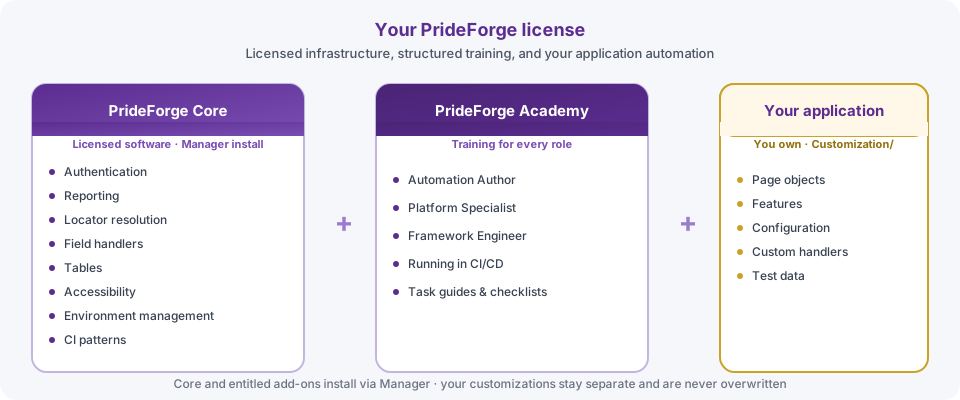
PrideForge is a licensed automation solution plus PrideForge Academy for QA and SDET teams — production-ready software in your environment, not a generic framework tutorial or slide-deck-only training.
Reqnroll, Playwright, NUnit, and axe-core — wired together by PrideForge as the integration layer and conventions your team can hire for and maintain.
QA engineers, automation developers, and tech leads building a new framework, modernizing an existing one, or evaluating PrideForge against what they already run — often a QA lead, solo SDET, or consultant with budget authority who needs structure now, not after another quarter of rework.
The same open-source tools your team knows — organized so your team writes tests instead of reinventing plumbing.

Open-source stack integrated into a cohesive framework.
Readable Gherkin wired to shared steps and page objects. Drive the automation with human-readable instructions.


Handler priority allows PrideForge to find the right behavior for each control automatically. Built-in handlers cover common HTML, widgets, and compounds. Add your own in the customization layer and choose where they sit in the order — earlier slots run first, so you can override a generic default or add support for controls unique to your application.
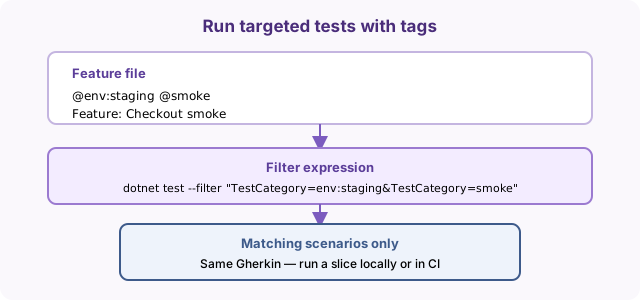
Tag features and scenarios with @env, @smoke, or your own labels —
then filter what executes locally or in CI without rewriting scenarios.
PrideForge is licensed by named user, not by test volume.
Each site license has two seat types. Core Engineer includes PrideForge Manager installs, framework source and updates, and PrideForge Academy. Academy is for team members who need training and documentation only — no Manager installs or package delivery.
Seats cover people, not runners or pipelines. Run unlimited internal automation on your own infrastructure with no per-run metering.
While your subscription is active, you receive Manager package delivery, updates, and Academy. If you do not renew, you keep the version and customizations you built during the active term. Manager updates, Academy, and future package delivery require renewal.
Most teams spend months building authentication, reporting, environments, and CI before real test coverage. A starter license is often less than 2–4 weeks of one engineer's loaded cost — for production-shaped software on day one.
Illustrative ranges only. Full table on Purchase.
| Seat type | PrideForge Academy | PrideForge Core (Manager) | Framework updates |
|---|---|---|---|
| Core Engineer | |||
| Academy user |
Core Engineers install and update PrideForge via Manager into your chosen folder (often committed to your company's source control). Updates change the core only — your customizations stay separate and are not overwritten. Academy users learn how to write and maintain tests against your company's copy — full course, documentation, and learning paths; no Manager installs.
Seat counts do not meter runners, pipelines, or CI — only named users need a seat.
PrideForge includes built-in volume pricing for growing teams. Use the license builder to calculate pricing for your organization.
Full FAQ, worked examples, and checkout are on the Purchase page.
Automation teams should spend their time testing software — not rebuilding automation infrastructure. Every section below answers how PrideForge helps you get there. When you are ready to license, build your license on the Purchase page.
The homepage already shows the timeline and economics. The sections below explain how PrideForge solves each infrastructure problem — with examples you can evaluate against your stack.
Most code-first stacks keep meaningful authoring with engineers. PrideForge adds readable Gherkin, reusable steps, and Academy training so product owners, manual testers, business analysts, and domain experts can write and review scenarios — while engineers maintain step definitions, page objects, and handlers underneath.
See the side-by-side login example in .
Runnable software on day one — skip months of plumbing and begin with production-shaped patterns your team can run immediately, not an empty tutorial repository.
Reqnroll, Playwright, NUnit, and axe-core — familiar open-source tools wired together by PrideForge.
Managers buy faster onboarding, not slide decks. PrideForge Academy teaches shared standards mapped to the solution you license — Gherkin and shared steps widen who can author tests while engineers maintain how scenarios run.
Gherkin scenarios describe behavior in plain language; reports show which steps ran and failed, not opaque method calls.
Your modifications stay separate from the framework core — extend PrideForge without forking so upgrades stay predictable.
Named locators, shared steps, and consistent patterns mean less rework when applications change.
Your features, page objects, and configs remain yours for internal automation after your subscription ends.
PrideForge separates your customizations from the framework so upgrades remain predictable and your automation stays maintainable.
Illustrative economics and starter pricing are on the homepage and Purchase.
This is PrideForge's second ROI story: engineers build the reusable automation layer once, then QA and domain experts contribute scenarios in readable Gherkin — so coverage scales without every test waiting on one SDET.
Shared steps handle browser automation once; new tests focus on your application, not repeated setup. The same language works as living documentation for reviewers and in run reports: stakeholders see which business steps passed or failed, not source lines.
Imperative test code on the left; a few lines of Gherkin on the right — same behavior, less boilerplate per test.
Every test repeats navigation, locators, and assertions.
 1import { test, expect } from '@playwright/test';
 2
 3test('admin login shows authenticated status',
 4  async ({ page }) => {
 5  await page.goto('/login.html');
 6  await page.getByLabel('Username').fill('admin');
 7  await page.getByLabel('Password').fill('localpass123');
 8  await page.getByRole('button', { name: 'Sign in' }).click();
 9  await expect(page.locator('#auth-status'))
10    .toContainText('Authenticated as admin');
11});Shared steps and named page objects — selectors stay out of the scenario.
 1Feature: Local login
 2
 3  Scenario: Successful login with local admin user
 4    Given I am logged in as "admin"
 5    Then The "LocalLoginHandler.AuthStatus" field
 6      should contain "Authenticated as admin"
Both use the same browser automation stack under the hood. PrideForge organizes it — Gherkin scenarios stay short and self-describing; engineers maintain step definitions and page objects once. Deeper examples ship with the licensed solution and Academy.
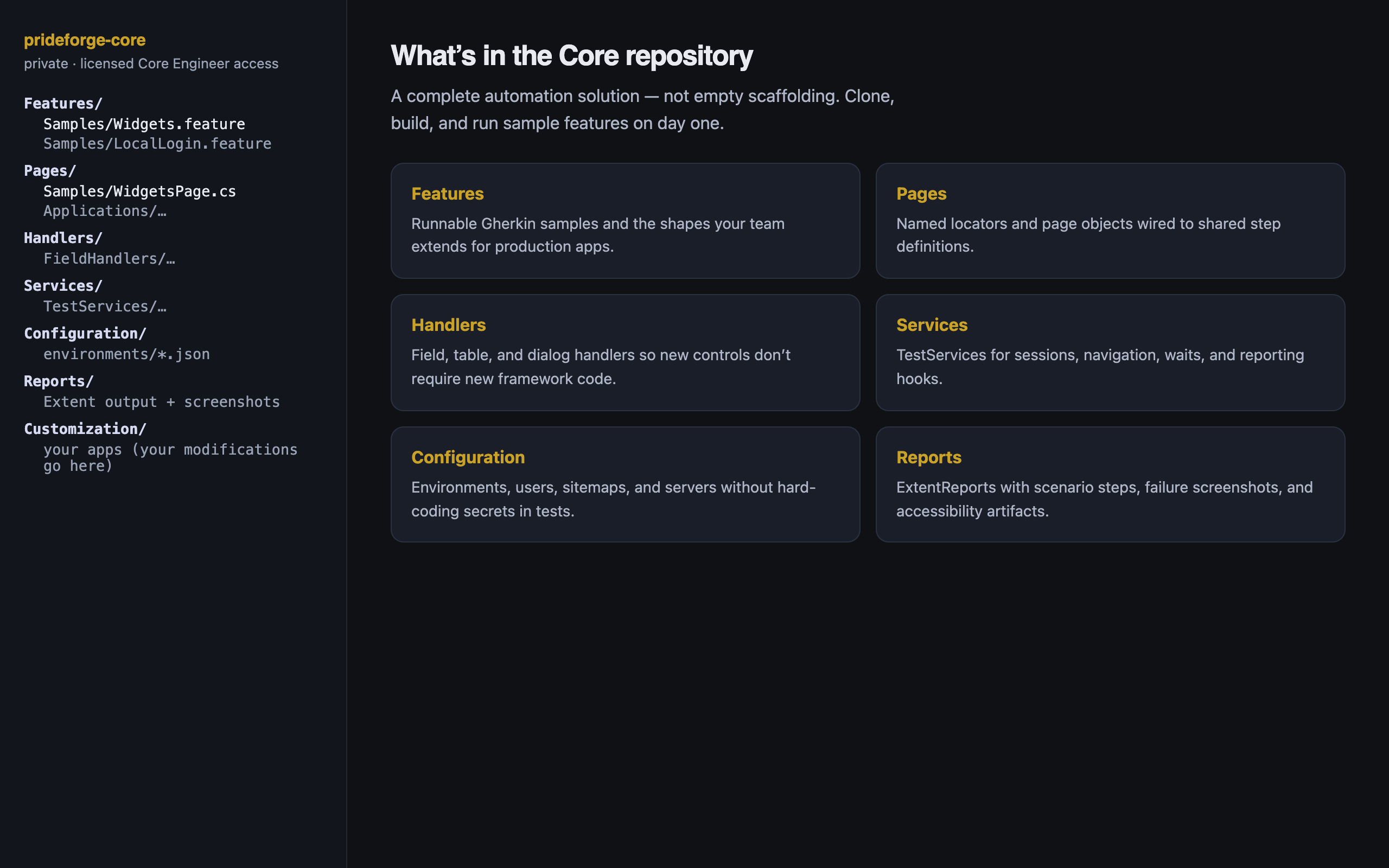
Named locators centralize element lookup on page objects instead of repeating selectors across tests and scenarios.
Named PageName.Member locators with an ordered fallback chain so tests survive label and markup churn.
Field handlers route set, get, and click to the right interaction for each control type — without per-field test code.
Add page classes to your solution; the framework discovers and registers them — no manual wiring list to maintain.
Search, select, paginate, and validate grids with shared steps — not a one-off helper per table in your app.
Handlers for Mud, MUI, Quill, comboboxes, and menu buttons — register new types when your UI needs them.
Lets your team run the same framework against multiple products, servers, and URLs — configuration drives where tests execute and how login and navigation behave per target, without forking your step library.
Multi-server configuration, app vs server scoping, and guards so tests do not run unauthenticated by accident.
Smart vs forced login, saved sessions, and parallel-safe storage — spend less time re-authenticating every scenario.
One login step in Gherkin; application-specific UI stays behind a login registry you configure per product.
Sitemap-driven routes: jump by URL or walk menus using shared navigation steps tied to your environment config.
Runtime tokens resolve test data from files, tables, and stores — keeping values out of step code instead of hardcoded in every scenario.
Dates, variables, data-file paths, and values captured from the UI — resolved when steps run, not hardcoded in every test.
JSON/CSV test data, persistent stores, Gherkin tables, and scenario outlines for data-heavy flows.
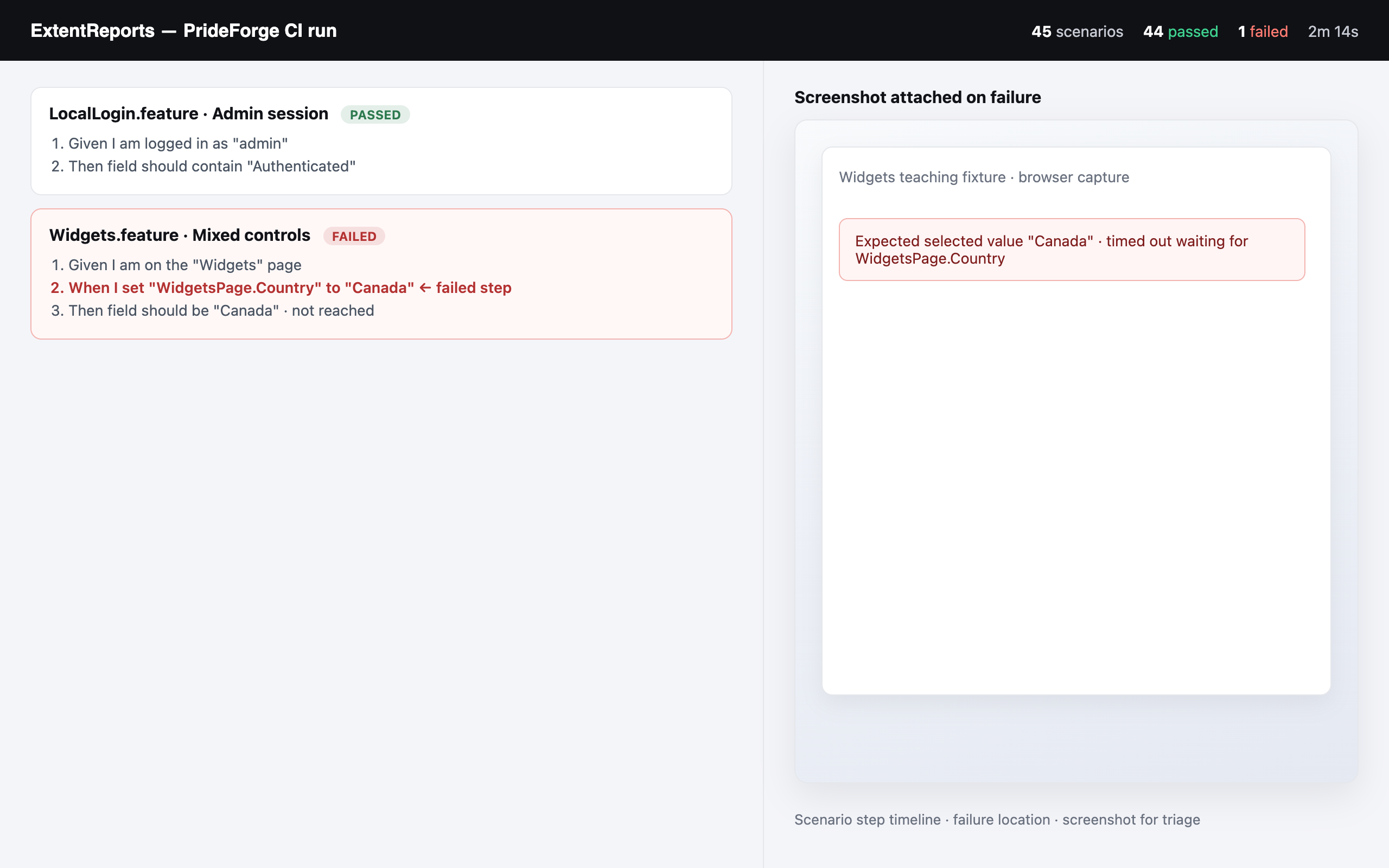
Reports show pass/fail with scenario steps, screenshots, and diagnostics — so failures triage without raw logs alone. Gherkin carries the same language into reports: stakeholders see which business steps passed or failed, not source lines.
12 passed
1 failed
login.spec.ts:45
Timeout 30000ms waiting for locator('#submit')
  at login.spec.ts:45:12
Counts and stack traces · no scenario steps · screenshots not automatic
Accessibility testing is built in, supported, and configurable. Lets your team run axe-core scans from Gherkin scenarios and produce reviewable pass-or-fail artifacts for release gates — not console dumps alone.
3 violations found
  serious: 2
  moderate: 1
#color-contrast (serious)
#aria-hidden-focus (serious)
Console output only · no gate policy · no scenario context or screenshots
Impact summary · release gate · known-issue list · HTML + JSON + screenshots
The Academy is a hands-on course included with licensed seats — built entirely around the solution you license. It teaches your team how to run, configure, and extend PrideForge, not generic “how to build a framework” theory or slide-only training. Academy is how new team members learn the same patterns your CI runs — so knowledge is not trapped with whoever built the framework first.
Each class maps to runnable Gherkin in your installed solution. You read a lesson, run the matching scenarios in your IDE, and experiment with the same patterns your team uses in CI. Samples are there to test and understand capabilities — handlers, locators, tables, reporting, accessibility, and configuration — before you wire in your production applications.
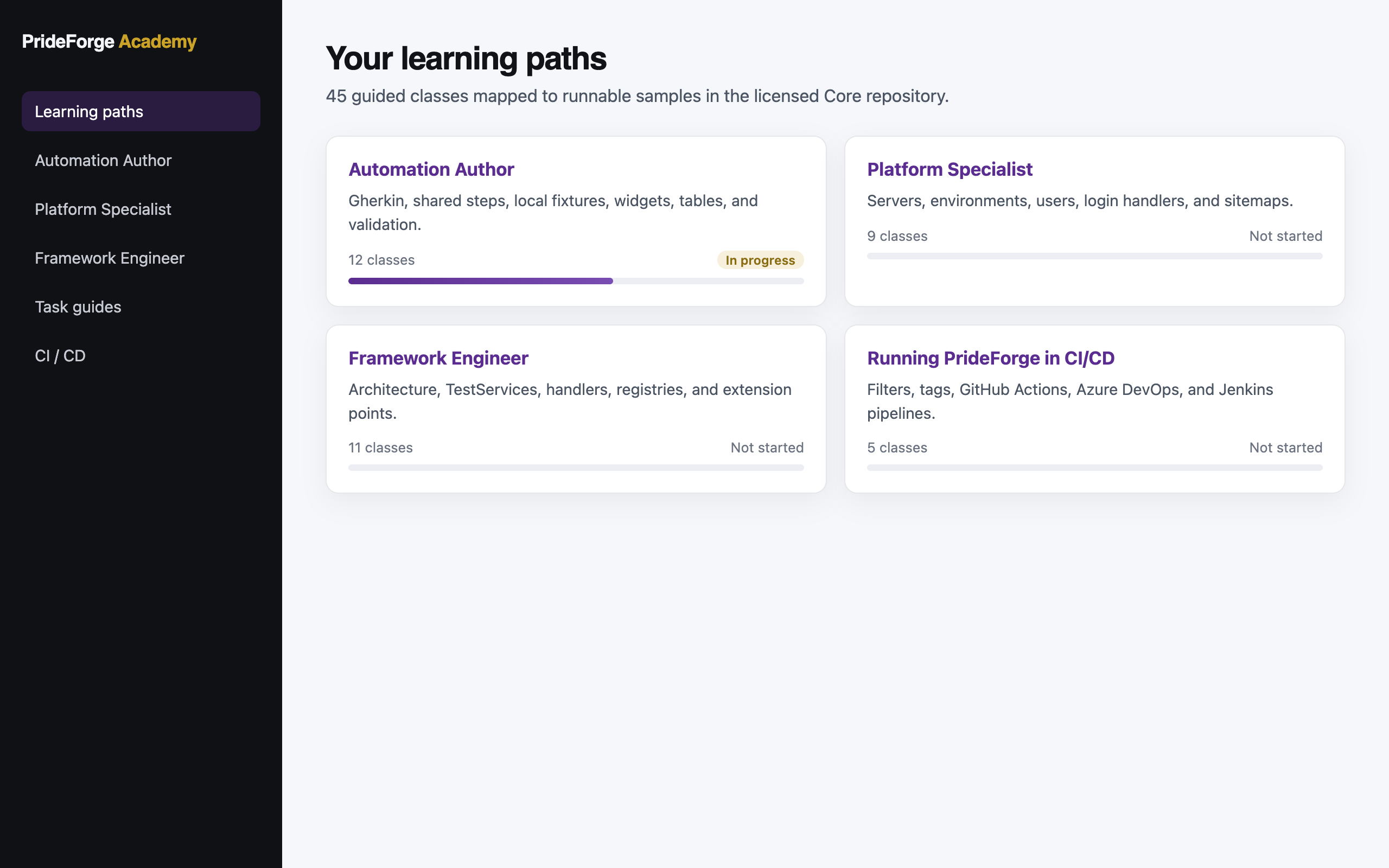
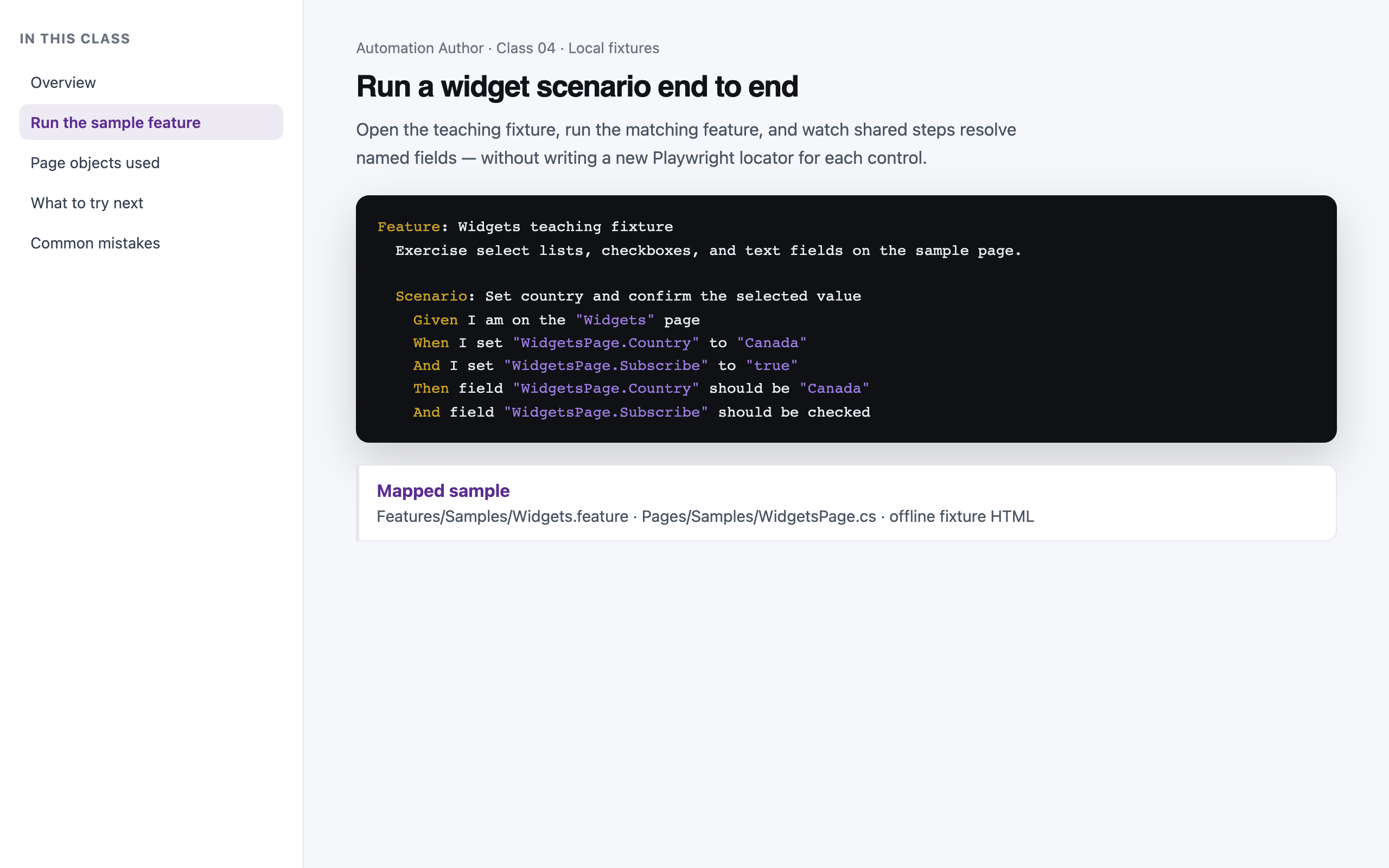
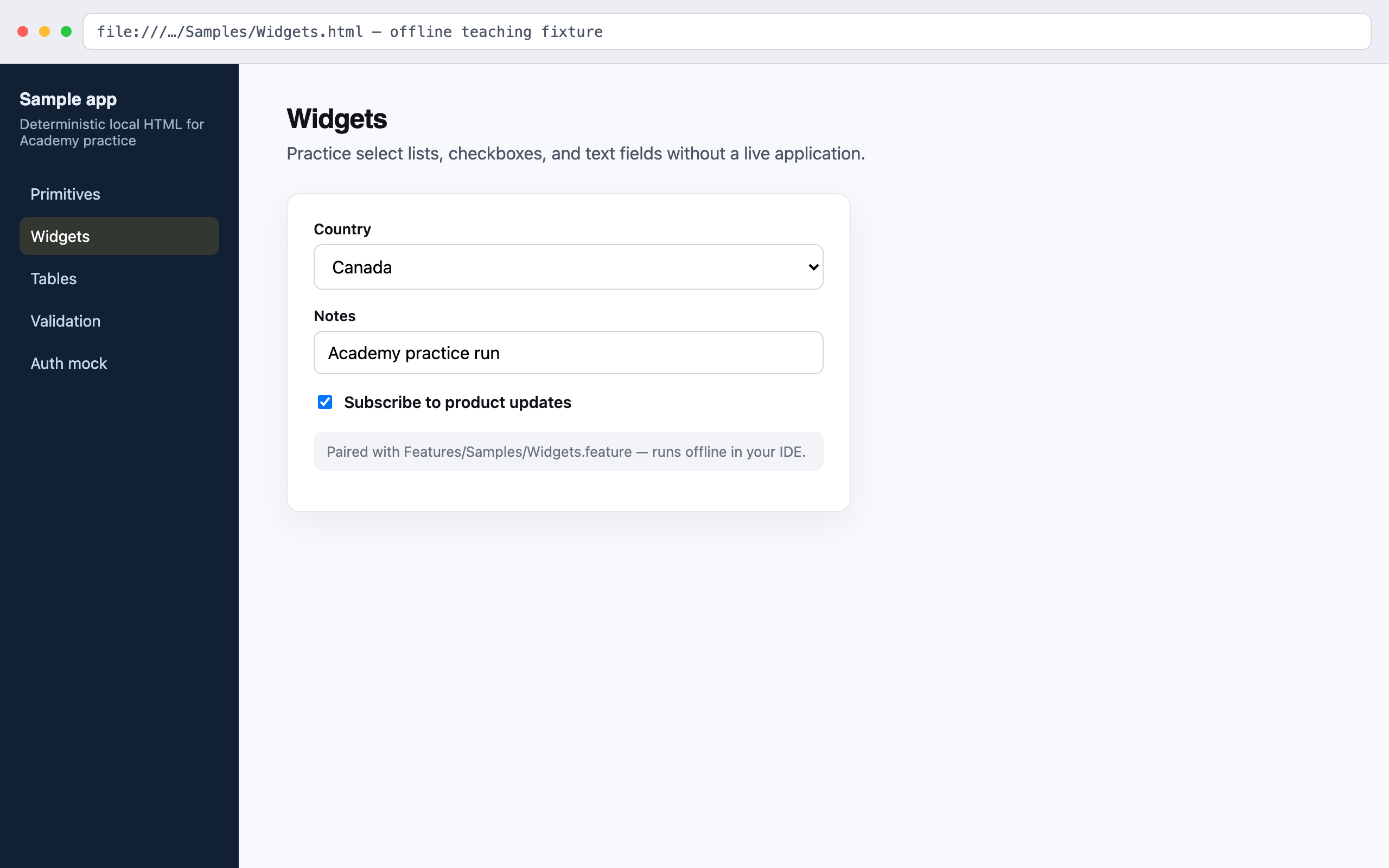
Deterministic sample pages for primitives, widgets, tables, validation, and more — paired with runnable scenarios so you can modify and learn each pattern hands-on.
Academy classes point at specific features and page objects in the licensed solution. Read the concept, run the sample, then apply the same steps to your application’s pages and configs.
Samples pass deterministically without network access. Optional reference features show live-app patterns; local fixtures keep onboarding fast and repeatable for every Academy seat.
Walkthroughs for servers, login, sitemaps, handlers, and adding your own applications — so learners know when to extend the framework versus reuse existing steps.
45 guided classes organized into paths that mirror how teams adopt PrideForge — from first scenarios through configuration, task checklists, and CI/CD.
Built from 20+ years of automation engineering
I've designed and built automation frameworks across organizations for more than two decades. Every new project started the same way: months rebuilding authentication, reporting, environments, page objects, locators, CI, and onboarding — important work, rarely unique to the application.
PrideForge packages the patterns that repeatedly worked — production-shaped infrastructure on standard open-source tools, a separate customization layer, and Academy training so every role learns the same architecture.

Core Engineer seats start at $3,000/year and include PrideForge Manager installs, framework updates, and PrideForge Academy. A typical starter team (1 Core + 3 Academy) is about $4,500/year.
Academy seats are for team members who write and maintain tests — course access, documentation, and learning paths only; no Manager installs. Each seat is one named user — not a cap on tests, agents, or pipelines.
You keep what you build. If your subscription ends, you lose Manager package delivery, Academy, and future updates, but your organization may continue using the version of PrideForge and customizations created during your active subscription for internal automation.